Liantis – Connection Guide
Liantis is a Belgian HR and payroll service provider offering employers solutions for payroll administration, social secretariat services, and employee management.
How to connect to Liantis
This guide walks you, as a Liantis customer (employer / werkgever), through connecting your Liantis account so the integration can read your employee data.
Liantis uses an OAuth 2.0 client-credentials connection that the integration provider has already configured. On your side, you only need to provide your Company Number (KBO) — but first your access has to be activated by Liantis.
1. Activate access with Liantis
Before you can connect, Liantis must enable API access for your company. To start this:
- Contact your Liantis klantenadviseur (account manager) and let them know you want to activate an integration via Apideck.
- Your account manager escalates the request to Liantis Integration Services, who set up your access and a testing environment.
This step is required — the connection will not work until Liantis has activated API access for your company number.
2. Find your Company Number (KBO)
Your Company Number is your company's registration number in the KBO (Crossroads Bank for Enterprises / Kruispuntbank van Ondernemingen).
- Enter it without the
BEprefix. - Enter it as a continuous series of 10 digits, with no spaces or dots.
- Example:
0123456789
3. Configure the connection
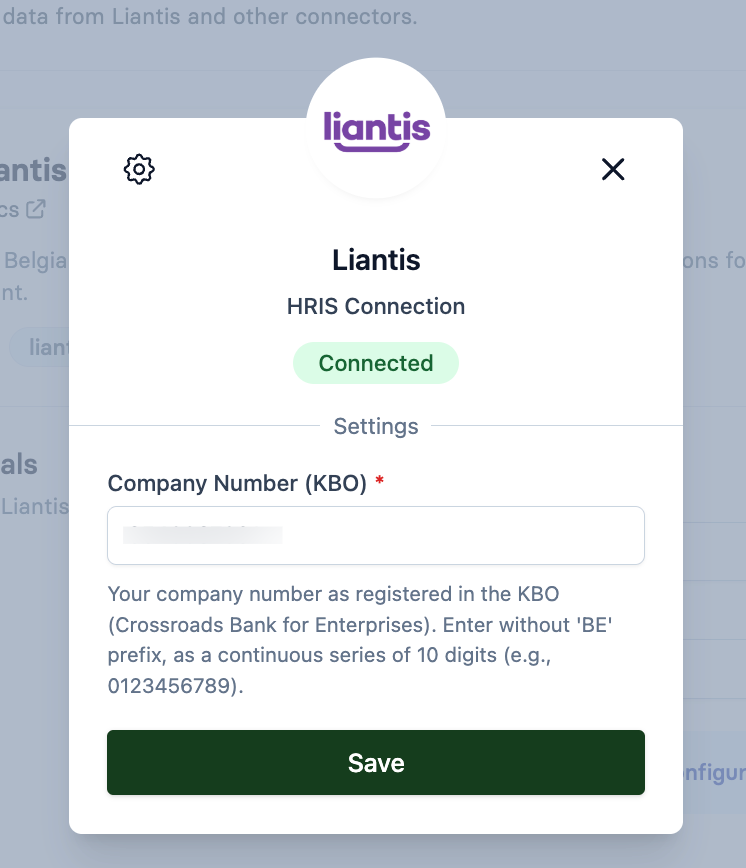
In the Vault connection window, fill in the Settings:
| Field | Description |
|---|---|
| Company Number (KBO) | Your company number as registered in the KBO, without the BE prefix, as 10 continuous digits (e.g. 0123456789). |
Click Save. Provided Liantis has already activated your access (step 1), the connection status changes to Connected.