Exact Online NL – Configuration Guide
Exact Cloud business software offers accounting and industry software in the cloud for SME's on desktop, laptop, tablet and mobile apps.

How to Create OAuth Credentials for Exact Online NL
This guide will help you set up your Exact Online OAuth app for the Dutch Exact Online instance and add its credentials to Apideck.
Before you begin, you'll need:
- An Exact Online account on the Dutch instance (
start.exactonline.nl) with access to the App Store. This connector is pinned to the Netherlands, so the app you register must live in the NL App Store. - An Exact Online developer subscription for the Netherlands if your app will connect consumers outside your own Exact Online instance. Exact charges EUR 15 per month excluding VAT for it (confirmed August 2026 — check Exact's developer sign-up wizard for the current figure before you budget). An app that only ever connects your own Exact Online NL license does not need it: the current Exact Online Connectivity Terms and Conditions (Netherlands) make that case free of charge.
- A user in that instance that is allowed to authorize third-party app connections.
You can start before you own an app. Apideck ships temporary shared test credentials for this connector, so you and your consumers can authorize a real Exact Online NL account and exercise the API straight away — the consent screen simply shows Apideck instead of your brand. Register your own app when you are ready to ship, and follow the steps below. (The Exact Online NL connector is the only one of the three Exact Online connectors with shared credentials.)
Which connector am I configuring?
exact-online-nlhas a fixed Dutch host and no region setting, and an app registered in the NL App Store cannot connect consumers on the Belgian, UK, German or any other Exact Online instance. If your consumers span several countries, use theexact-onlineconnector — it lets each consumer pick their country with the Select your API domain connection setting — orexact-online-ukfor a UK-pinned integration.
1. Create the OAuth application
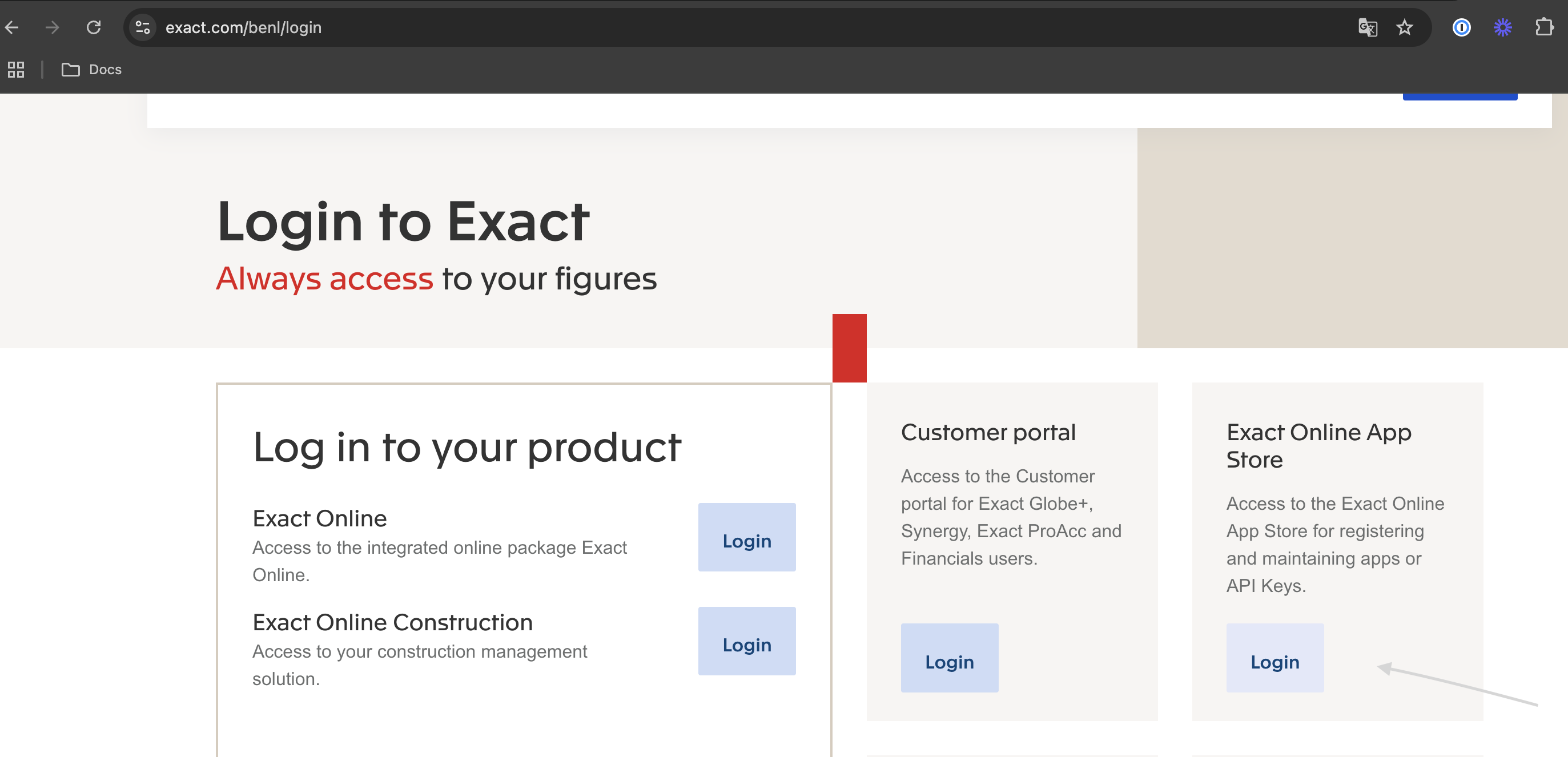
Sign in to the Exact Online App Store NL
-
Sign in to the Exact Online App Store NL. Exact's Register your app article walks through the developer sign-up, which is also reachable from the "Are you an app developer?" section at the bottom of the App Store.

Register a test app
-
Click Register a test app (you can move it to production later)
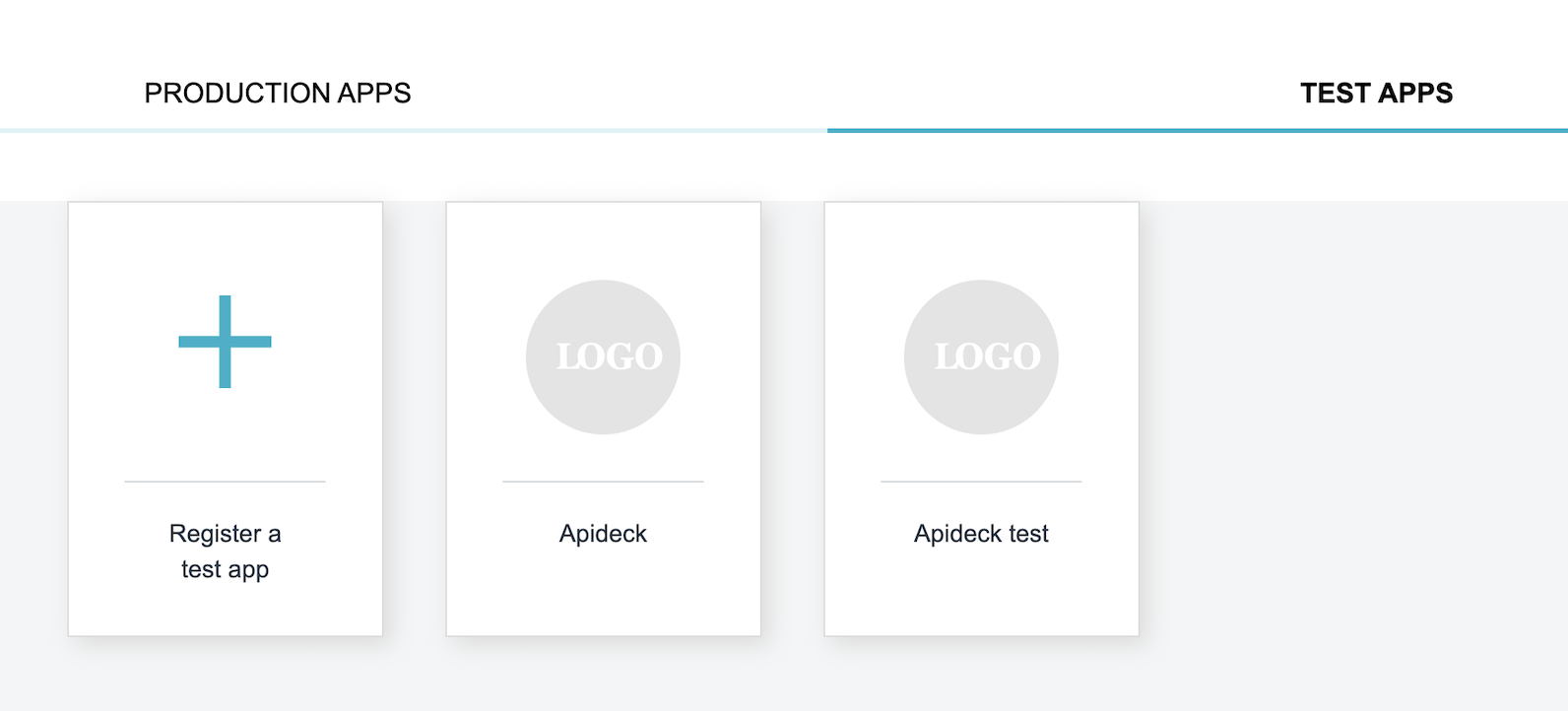
Exact advises keeping the number of app registrations to a maximum of four — for example one per DTAP stage (development, test, acceptance, production) — so plan your registrations before you create them.
Configure app details
-
Enter the following details:
- App Name: Choose a descriptive name for your app
- Redirect URI:
https://unify.apideck.com/vault/callback - Accept the terms and conditions
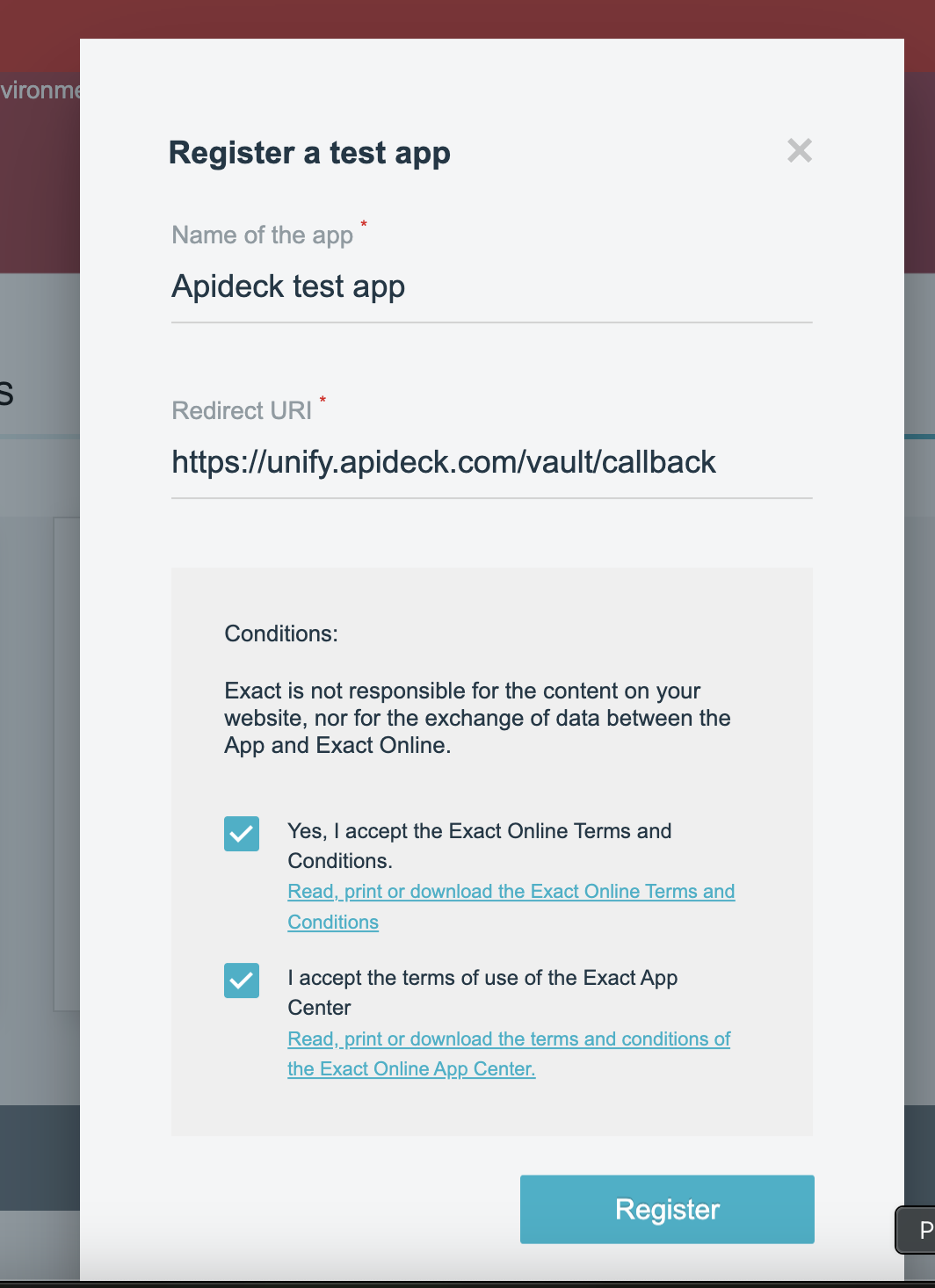
The redirect URI must be exactly
https://unify.apideck.com/vault/callback. Exact rejectslocalhostand any non-HTTPS redirect URI, and a mismatch fails authorization. Do not add a vendor or local development URL here — Apideck handles the callback for every connection.
Get your OAuth credentials
-
After creating the app, note down the Client ID and Client Secret
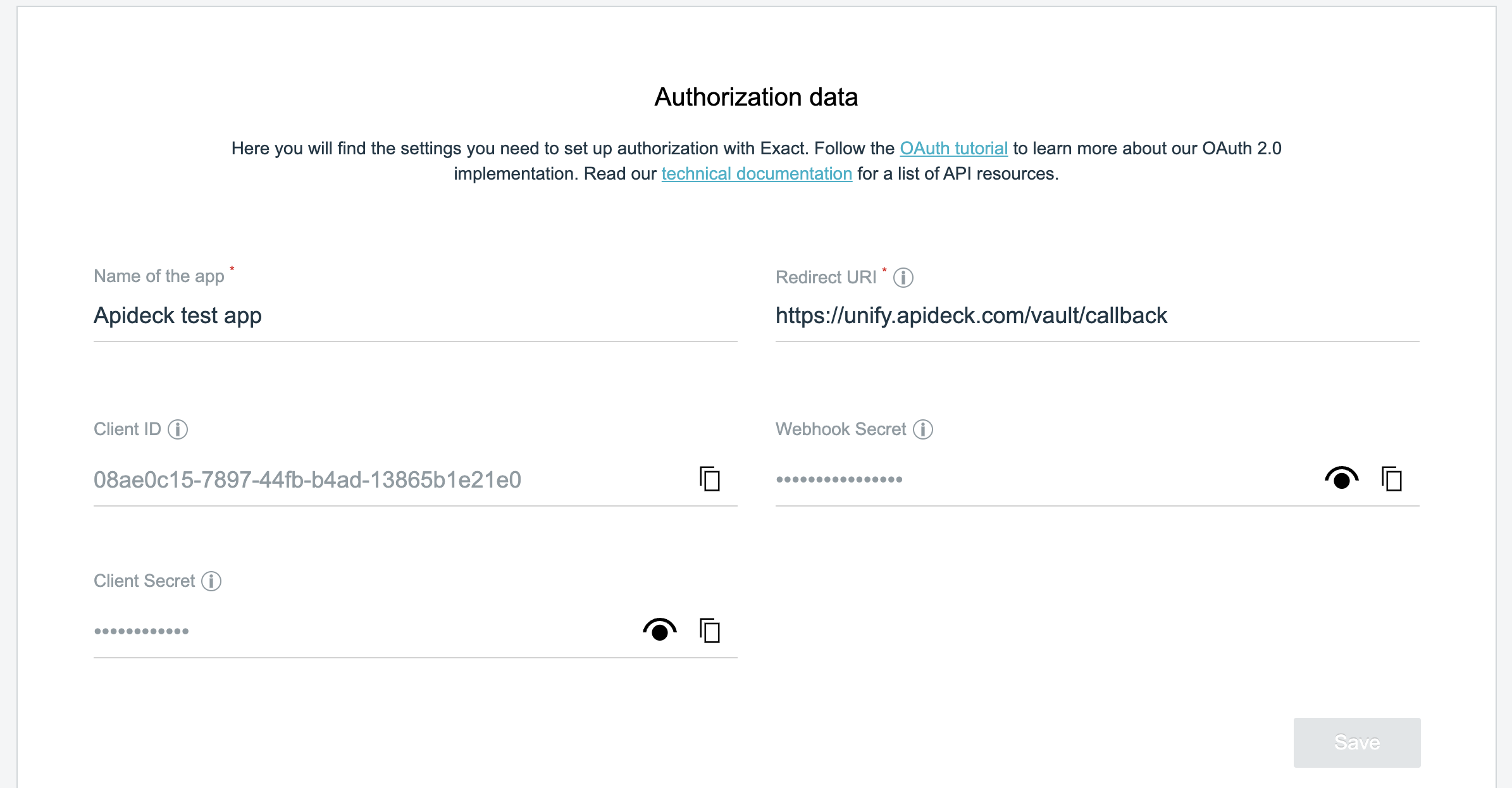
💡 TIP: Copy the Client ID and Client Secret immediately. The Client Secret may only be visible once when you first create the app.
2. Add the credentials in Apideck
-
Open the Exact Online NL connector configuration in the Apideck Dashboard
-
Select Use your Exact Online client credentials
-
Enter the following OAuth credentials:
- Client ID →
client_id: Paste the Client ID from your Exact Online app - Client Secret →
client_secret: Paste the Client Secret from your Exact Online app
- Client ID →
-
Click Save settings to save your credentials

Once your own credentials are saved, every new connection uses them instead of Apideck's shared test credentials. Exact Online uses the same app credentials for testing and production, so keep testing on the Dutch instance — credentials, tokens and division ids issued on the NL host are not portable to another country's host — and be careful when testing against production data.
3. Scopes
There is nothing to select. Exact Online grants access at the app-registration level rather than per consent scope, and the connector declares the Code, Description and Division scopes itself — so there is nothing to configure either in the NL App Store registration or in Apideck.
What a connection can reach is instead bounded by the authorizing user's own Exact Online rights and by the division (administration) the connection resolves. Apideck fills the division id in automatically after authorization; your consumers never type it, and multiple companies are addressed with the x-apideck-company-id header.
4. Get your app reviewed before onboarding customers outside your own instance
A freshly registered app works immediately for consumers in the same Exact Online instance that created it — which is everything you need to build and test end to end. To connect customers on other Exact Online tenants, submit the app for Exact's internal review from the App Store; once it passes, it can serve consumers across the Dutch instance. Ask your Exact contact for an expected timeline so you can sequence your pilot customers around it.
Publishing the app on the Exact Online App Store is a separate, optional step with its own review process. An approved app can serve external customers without being published, so App Store publication is not on the critical path for a private integration.
5. Design notes before you go live
- Token handling is Apideck's job. Access tokens last 10 minutes and Apideck refreshes them automatically. You do not store or rotate anything.
- Refresh tokens are single-use and go stale after 30 days of inactivity. Each refresh invalidates the previous token, and a connection that goes unused for 30 days needs the consumer to authorize again. If your product has seasonal or low-frequency users, plan a re-authorization prompt for them.
- Writes that hit a journal need a journal code. Creating bills requires a valid purchase journal code (the
purchase_journal_codeconnection setting), and creating payments or bill payments requires a valid bank journal code (bank_journal_code) — otherwise Exact returns an "Invalid journal" error. Decide whether you set these per connection during onboarding or expose them to your consumers. - The Dutch instance accepts larger payloads. NL (and Belgium) allow REST messages up to 38 MB, against 9.5 MB on other country instances — useful headroom if you push large attachments.
- Call budgets are per app, per company. The per-minute and per-day limits are listed on the connector's Overview and on Exact's API limits page. Build your sync to back off on errors rather than retrying tightly.
6. Test your connection
Now that your Exact Online NL connector is configured, test the connection:
- Open Test Vault from the connector configuration
- Click Authorize to authorize the connection. There is no region to pick — this connector always uses the Dutch instance.

- You will be redirected to the Exact Online (Netherlands) domain to sign in
- Once authorized, the connection status changes to Connected

FAQ and troubleshooting
Authorization fails with an invalid redirect or a 401. The redirect URI in your Exact app registration must be character-for-character https://unify.apideck.com/vault/callback. Exact rejects localhost and non-HTTPS values outright.
A consumer outside the Netherlands cannot authorize. App registrations are per country instance, and this connector is pinned to the Dutch one. Serve those consumers through exact-online-uk for the UK, or through the exact-online connector with an app registered in their country. Note that a connector configuration holds a single Client ID and Secret for every connection made through it, so each country you support needs its own configuration with that country's app credentials.
A consumer on another Dutch Exact Online tenant cannot connect. Until the app passes Exact's internal review it is limited to the instance that created it. Submit it for review from the App Store — and in the meantime that consumer can still connect through Apideck's shared test credentials.
A connection that used to work now asks for authorization again. The refresh token expired after 30 days without use, or the consumer revoked access in Exact Online. The consumer needs to re-authorize; nothing in your Apideck configuration changes.
Calls start returning 429. You are over Exact's call budget for that app and company. Serialize the requests and add backoff. If a consumer legitimately needs a higher ceiling, that is a conversation about their Exact Online plan.
Still stuck? Reach out to Apideck Support.